مفتوح المصدر · CLI محلي

CI لديك يتعطّل.
Stitch يُصلحه.

شغّل الـ CI الخاص بك محليًا. أصلح حالات الفشل بالذكاء الاصطناعي. يقرأ Stitch إعداد CI الموجود لديك، ويشغّل الوظائف على جهازك خلال ثوانٍ، ويسلّم حالات الفشل إلى وكيل ذكاء اصطناعي يُصلحها. لا مفاتيح API، ولا ملفات إعدادات.

ابدأ الآن
01 —— how it works

A bird that weaves the loose threads of your pipeline.

Stitch runs your CI config — but on your machine, before you push. When it finds a failure, it hands the context to Claude and applies the patch. No broken PR opened.

Read .github/workflows/ci.yml
Run jobs locally (Docker)
Detect failures and collect context
Hand errors + stack to the agent
Apply the patch and re-test
Green. Ready to push.
~/acme-api · stitch-agent live
0
ملفات إعدادات
2
وكلاء ذكاء اصطناعي
~10s
زمن التغذية الراجعة
100%
من CI لديك
02 —— principles

Local by design.
Transparent by principle.

We never ship your code anywhere you did not authorize yourself. The agent reads, runs, patches — all inside your machine.

ثلاث مراحل. محلي بالكامل.

من التكوين إلى CI أخضر، ينفذ Stitch الحلقة بأكملها على جهازك دون مغادرة الطرفية.

تحليل

شغّل stitch run claude. يحلّل Stitch ملف .gitlab-ci.yml أو سير عمل GitHub Actions، ويصنّف المهام، ويتخطى مهام البنية التحتية تلقائياً.

تنفيذ

تعمل المهام محلياً مع مهلات وعزل. تظهر النتائج في واجهة TUI مباشرة مع تتبّع التقدم. ثوانٍ وليست دقائق.

إصلاح

تُسلَّم المهام الفاشلة إلى وكيل الذكاء الاصطناعي لديك (Claude Code أو Codex). يحقق الوكيل، ويعدّل الملفات، ويعيد Stitch التشغيل للتحقق. حتى 3 محاولات قبل التصعيد إليك.

I

Your repo. Your machine.

No intermediate server. Stitch runs in your shell, reads your file tree, and writes patches on top. Shut it down and nothing lingers.

II

Zero new API keys.

Uses the Claude Code credentials you already have. We do not ask for tokens, we do not store anything.

III

Everything is reversible.

Every patch lands in an isolated commit. git reset takes you back exactly where you were.

IV

No magic.

Whatever you would see in your cloud CI, you see in your terminal. Same jobs, same containers, same result — without the wait cycle.

03 —— المميزات

كل ما يحتاجه خط أنابيب CI لإصلاح نفسه

يرصد Stitch ما يفلت من مراجعة الكود — أخطاء الـ lint، وعدم تطابق الأنواع، والاختبارات المعطوبة — ويُصلحها قبل أن تنتبه إليها.

بدون إعداد

يستخدم ملف .gitlab-ci.yml أو GitHub Actions الموجود لديك. بلا إعداد، بلا إعادة كتابة، بلا YAML إضافي.

الأولوية للمحلي

يشغّل الوظائف على جهازك خلال ثوانٍ. دون انتظار مشغلات CI البعيدة أو طوابير خطوط الأنابيب.

وكلاء ذكاء اصطناعي قابلون للتوصيل

وصّل Claude Code أو OpenAI Codex. يستخدم اشتراكك الحالي. بدون أي مفاتيح API لإدارتها.

واجهة طرفية تفاعلية

واجهة طرفية أنيقة تعرض التقدّم وحالة الوظائف ونشاط الـ driver لحظيًا أثناء عمل Stitch.

وضع المراقبة

تحقّق مستمرّ أثناء كتابة الكود. تُعاد الوظائف تلقائيًا عند تغيّر الملفات.

تصفية ذكية للوظائف

تصنّف وتتجاوز وظائف النشر والإصدار والبنية التحتية. تشغّل محليًا ما يهمّ فقط.

Commit وPush تلقائيًا

عند نجاح الإصلاحات يقوم Stitch بـ commit وpush تلقائيًا. تبقى أنت في تدفّق العمل.

متعدّد المنصّات

GitLab CI وGitHub Actions، بما في ذلك النسخ المستضافة ذاتيًا. يقرأ إعدادك الحالي كما هو.

04 —— مخرجات حقيقية. لا نماذج وهمية.

هذا هو Stitch. يعمل على جهاز حقيقي.

بقية هذه الصفحة تشرح ما يفعله Stitch. التسجيلات أدناه تُظهر كيف يبدو Stitch وهو يفعل ذلك. مأخوذة من طرفية حقيقية، دون تحرير.

تشغيل مباشر

يتولّى الوكيل الأمور عند فشل إحدى المهام

أمر واحد. يحلّل Stitch إعداد CI لديك، ويشغّل مهام التحقق محليًا، ويسلّم حالات الفشل إلى Claude Code أو Codex، ثم يعيد التحقق من الإصلاح. كل ذلك يتدفّق في نافذة طرفية واحدة.

  • Pipeline stepper مراحل parse وexecute وfix مع مؤشّر تقدّم حيّ في الأعلى.
  • Live job table كل مهمة مع حالتها وعدد محاولاتها وزمنها، تتحدّث مباشرة أثناء التشغيل.
  • Driver panel ترى ما يفعله الوكيل فعليًا: الملفات التي يقرؤها، الأوامر التي ينفّذها، والرقع التي يطبّقها.
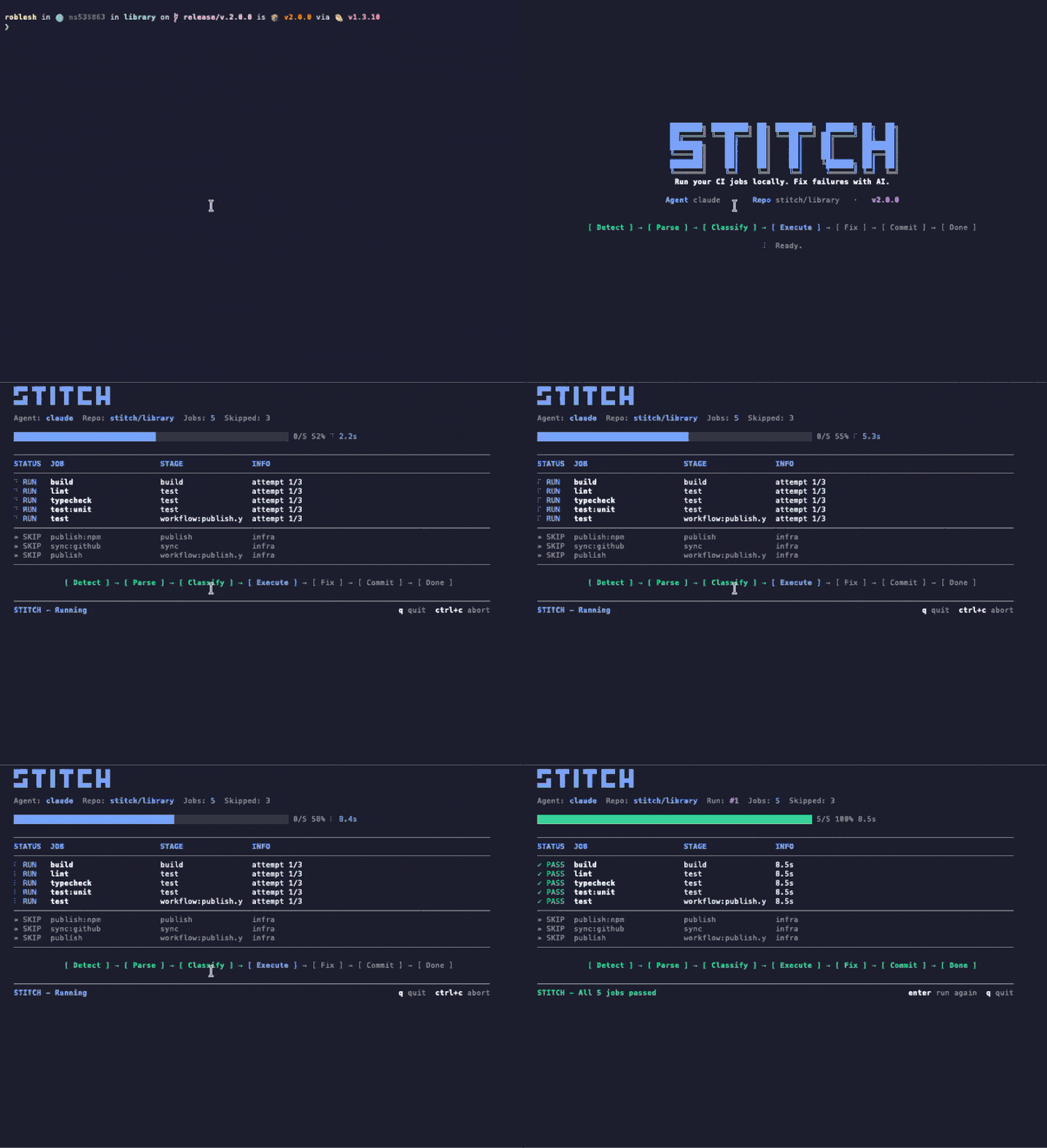
~/repo $ npx stitch-agent run claude
Animated terminal recording of stitch run claude showing the TUI with pipeline stepper, job table, and agent driver panel
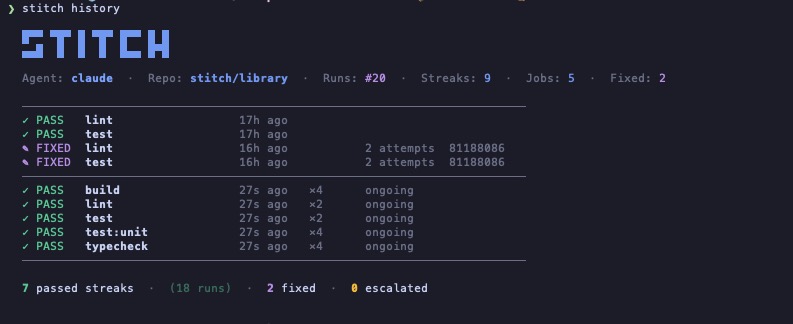
~/repo $ stitch history
Terminal screenshot of stitch history command showing STITCH ASCII logo, agent info, and a table of recent runs with pass, fixed, and ongoing states
سجلّ التشغيل

كل تشغيل محفوظ. سلاسل نجاح، إصلاحات، تصعيدات.

يسجّل Stitch كل تشغيل أجراه على مستودع. تعرف بنظرة سريعة أيّ المهام تنجح وحدها، وأيّها احتاج للوكيل، وأيّها تمّ تصعيدها. بلا لوحة تحكّم وبلا حساب. مجرد ملف على جهازك.

  • Streaks سلاسل PASS تُظهر مهام التحقق التي تواصل النجاح دون تدخل.
  • Fixes مدخلات FIXED تسجّل اللحظة التي حلّ فيها الوكيل فشلًا ما، مع عدد المحاولات والـ commit.
  • Escalations حالات الفشل التي لم يتمكّن الوكيل من حلّها ضمن سقف المحاولات تُبرز، لا تُخفى.
05 —— متكامل مع Claude Code

وكيلك يتحقق من كودك دون أن تطلب ذلك.

يأتي Stitch مع skill خاص بـ Claude Code. ثبّته مرّة واحدة فيقوم Claude بتشغيل Stitch تلقائيًا في اللحظات الأربع التي يتسلّل فيها الكود المعطوب عادةً. بلا flag، بلا أمر، بلا prompt.

كيف يبدو الأمر

1
أنت

تكتب "commit and push" داخل Claude Code.

2
Claude

يشغّل Stitch محلياً في ثوانٍ، وتظهر واجهة TUI مباشرة في نفس النافذة.

3
النتيجة

أخضر، يمرّ الـ push. أحمر، يصلحه Claude أولاً ثم يقوم بـ push.

أربعة محفّزات تلقائية

قبل كل push

تطلب من Claude عمل push أو commit أو فتح PR، فيبدأ Stitch أولاً. إذا فشل شيء يبقى الـ commit على جهازك.

في نهاية أي مهمة

ميزة انتهت، علّة أُصلحت، إعادة هيكلة اكتملت. يشغّل Claude عندها Stitch كخطوة أخيرة قبل إعلان انتهاء العمل.

قبل وضع علامة اكتمال على todo

إذا كان عنصر TodoWrite يمسّ كودًا قد يتحقق منه الـ pipeline، يشغّل Claude Stitch قبل وضع علامة الإتمام.

عند تبديل السياق

حين تنتقل إلى تغيير آخر، يفحص Claude السابق حتى لا يترك شيئًا معطوبًا خلفه.

ثبّت الـ skill مرة واحدة

symlink واحد. يلتقطه Claude Code تلقائيًا وينطلق مع عبارات طبيعية مثل "تحقق من هذا" أو "أصلح الـ pipeline". ويمكنك دائمًا استدعاؤه صراحةً بـ /stitch.

من نسخة محلية
$ ln -s "$(pwd)/skills/stitch" ~/.claude/skills/stitch
من تثبيت npm عالمي
$ ln -s "$(npm root -g)/stitch-agent/skills/stitch" ~/.claude/skills/stitch
06 —— مقارنة

كيف يقف Stitch مقارنة بغيره

يريد معظم مساعدي الـ CI منك أن تعتمد سحابتهم أو monorepo الخاص بهم أو SDK الخاص بهم. يقرأ Stitch ما لديك أصلاً ويعمل على الجهاز الذي تملكه أصلاً.

القدرة Stitch Gitar Nx Cloud Dagger + AI
يستخدم إعداد CI الحالي لديك
يشغّل المهام محليًا سحابي فقط سحابي فقط حاويات
وكيل ذكاء اصطناعي قابل للاستبدال أي وكيل CLI المدمج فقط المدمج فقط المدمج فقط
يتطلّب بنية تحتية جديدة لا شيء حساب SaaS Nx monorepo Dagger SDK
تكامل أصيل مع Claude Code يأتي مع skill
السعر مجاني من $20/مستخدم/شهر باقة Nx Cloud مجاني (OSS)
07 —— الاستخدام

أمر واحد. الإعداد الذي لديك بالفعل.

يقرأ Stitch إعداد CI الموجود لديك أصلاً ويشغّل نفس الوظائف محليًا. لا تعديلات على خطّ الأنابيب، لا خدمات إضافية، لا ملف YAML جديد للصيانة.

terminal
# Run every CI job locally
$ stitch run claude

# Only the jobs you care about
$ stitch run claude --jobs lint,test

# See what would run, without running it
$ stitch run claude --dry-run

# Re-run automatically on every file change
$ stitch run claude --watch --jobs lint,test
.gitlab-ci.yml
# Your existing CI config. Stitch reads it,
# no jobs to add, no changes to make.

lint:
  image: node:20
  script:
    - bun install
    - bun run lint

test:
  image: node:20
  script:
    - bun install
    - bun test

typecheck:
  image: node:20
  script:
    - bun install
    - bun run typecheck
08 —— الأمان

حواجز حماية حقيقية، لا مجرّد وعود

يعمل Stitch داخل مستودعك بحدود صارمة على الوقت والنطاق وما يمكن أن يغادر جهازك. لا يحدث شيء خلف ظهرك.

مهلات التنفيذ

تعمل كل مهمة بمهلة قابلة للتكوين. الأوامر الجامحة تُقتل بـ SIGKILL، ولا تُترك معلّقة أبداً.

تخطّي البنية التحتية تلقائياً

مهام النشر والإصدار تُصنَّف كـ infra وتُتخطّى تلقائياً. مهام التحقق فقط تعمل محلياً.

فحص نظافة Git

يحدث الـ auto-commit والدفع فقط إذا كان الفرع نظيفاً قبل بدء Stitch. عملك غير المُكوَّم لا يُلمس.

محاولات محدودة

المهام الفاشلة تُعيد المحاولة حتى max_attempts (افتراضي 3). بعدها، يُصعِّد Stitch إليك بدل حرق الرموز.

يبقى محلياً

المهام والسجلات والإصلاحات كلها تعمل على جهازك. لا سحابة ولا قياس عن بُعد ولا webhooks إلا إذا ضبطتها.

.stitch.yml
languages: [typescript, python]
linter: eslint
test_runner: vitest
package_manager: pnpm
max_attempts: 3

conventions:
  - "Always use explicit return types on public functions."
  - "Never downgrade dependency versions."

auto_fix: [lint, format, simple_types, config_ci]
escalate: [logic_errors, breaking_changes, dependency_conflicts]

notify:
  channels:
    - type: slack
      webhook_url: https://hooks.slack.com/...
09 —— installation · 12 seconds

One command.
Zero config files.

node ≥20
v20.0+
claude code
installed
docker
optional
telemetry
never
10 —— questions

Questions we hear,
answered in plain words.

What does Stitch actually do?

Stitch reads your existing CI config (GitHub Actions or GitLab CI), runs the verify jobs locally on your machine, and hands any failure to your AI agent (Claude Code or Codex) to fix. When the fix passes locally, Stitch commits and pushes. No remote runner needed for the verify loop.

How is Stitch different from Nx Cloud, Gitar, or Dagger?

Nx Cloud, Gitar, and Dagger ask you to adopt their cloud, monorepo, or SDK. Stitch reads the CI config you already have and runs on the machine you already own. There is no SaaS account, no DSL, and the AI agent is whatever CLI you already use.

Does Stitch require API keys?

No. Stitch uses the Claude Code or Codex credentials you already have on your machine. There is nothing extra to manage and nothing extra to bill.

What CI providers are supported?

GitHub Actions and GitLab CI today, including self-hosted GitLab. Stitch parses the existing config and only runs verify-class jobs locally; deploy and publish jobs are skipped automatically.

Is Stitch free?

Yes. Stitch is open source under the MIT license, distributed on npm as stitch-agent. The only cost is whatever you already pay for your AI agent (Claude Code or Codex).

Does Stitch send my code anywhere?

No. Stitch runs locally. Your code stays on your machine. Your AI agent talks to its own API directly using your existing credentials, exactly the way it does when you run it manually. Stitch has no telemetry and no webhooks unless you configure them.

Can I use Stitch without Claude Code?

Yes. The agent layer is pluggable. Codex CLI works today; any CLI agent that takes a task description and returns code patches can be wired in. Claude Code is the default because we built the integration first, not because it is locked in.