오픈소스 · 로컬 CLI

CI가 망가집니다.
Stitch가 고칩니다.

CI를 로컬에서 실행하고, 실패는 AI로 고치세요. Stitch는 기존 CI 설정을 읽어 몇 초 만에 내 컴퓨터에서 잡을 실행하고, 실패는 고쳐 주는 AI 에이전트에게 넘깁니다. API 키도, 설정 파일도 필요 없습니다.

시작하기
01 —— how it works

A bird that weaves the loose threads of your pipeline.

Stitch runs your CI config — but on your machine, before you push. When it finds a failure, it hands the context to Claude and applies the patch. No broken PR opened.

Read .github/workflows/ci.yml
Run jobs locally (Docker)
Detect failures and collect context
Hand errors + stack to the agent
Apply the patch and re-test
Green. Ready to push.
~/acme-api · stitch-agent live
0
설정 파일
2
AI 에이전트
~10s
피드백 시간
100%
내 CI 커버
02 —— principles

Local by design.
Transparent by principle.

We never ship your code anywhere you did not authorize yourself. The agent reads, runs, patches — all inside your machine.

세 단계. 완전히 로컬.

설정에서 녹색 CI까지, Stitch는 터미널을 떠나지 않고 전체 루프를 당신의 머신에서 실행합니다.

파싱

stitch run claude를 실행하세요. Stitch는 .gitlab-ci.yml 또는 GitHub Actions 워크플로우를 파싱하고, 작업을 분류하며, 인프라 작업을 자동으로 건너뜁니다.

실행

작업은 타임아웃 및 격리와 함께 로컬에서 실행됩니다. 결과는 진행 상황 추적이 있는 라이브 TUI에 나타납니다. 분이 아닌 초 단위로.

수정

실패한 작업은 AI 에이전트(Claude Code 또는 Codex)로 전달됩니다. 에이전트가 조사하고, 파일을 편집하며, Stitch가 검증을 위해 재실행합니다. 당신에게 에스컬레이션하기 전에 최대 3회 시도.

I

Your repo. Your machine.

No intermediate server. Stitch runs in your shell, reads your file tree, and writes patches on top. Shut it down and nothing lingers.

II

Zero new API keys.

Uses the Claude Code credentials you already have. We do not ask for tokens, we do not store anything.

III

Everything is reversible.

Every patch lands in an isolated commit. git reset takes you back exactly where you were.

IV

No magic.

Whatever you would see in your cloud CI, you see in your terminal. Same jobs, same containers, same result — without the wait cycle.

03 —— 기능

CI 파이프라인 자가 치유에 필요한 모든 것

Stitch는 코드 리뷰를 통과한 문제들—린트 에러, 타입 불일치, 테스트 실패—을 잡아내고, 당신이 알아채기 전에 수정합니다.

제로 설정

기존 .gitlab-ci.yml 또는 GitHub Actions 설정을 그대로 사용합니다. 설치도, 재작성도, 추가 YAML도 없습니다.

로컬 우선

몇 초 만에 내 컴퓨터에서 잡을 실행합니다. 원격 CI 러너나 파이프라인 대기열을 기다릴 필요가 없습니다.

플러그형 AI 에이전트

Claude Code 또는 OpenAI Codex를 그대로 꽂아 씁니다. 기존 구독을 사용하며, 관리할 API 키가 없습니다.

인터랙티브 TUI

Stitch가 작업하는 동안 실시간 진행 상황, 잡 상태, 드라이버 활동을 보여 주는 예쁜 터미널 UI.

워치 모드

코딩하는 동안 지속적인 검증. 파일이 바뀌면 관련 잡을 자동으로 다시 실행합니다.

스마트 잡 필터링

deploy, publish, 인프라 잡을 자동으로 분류해 건너뜁니다. 로컬에서 필요한 것만 실행합니다.

자동 커밋 & 푸시

수정이 통과하면 Stitch가 자동으로 커밋하고 푸시합니다. 당신은 흐름 속에 머무를 수 있습니다.

멀티 플랫폼

GitLab CI와 GitHub Actions, 셀프호스팅 포함. 기존 설정을 그대로 읽습니다.

04 —— 실제 출력입니다. 목업이 아닙니다.

이것이 Stitch입니다. 실제 머신에서 돌아가는 중.

이 페이지의 나머지는 Stitch가 무엇을 하는지입니다. 아래 녹화는 Stitch가 그것을 하는 모습입니다. 실제 터미널에서, 편집 없이 캡처했습니다.

라이브 실행

작업이 실패하면 에이전트가 넘겨받습니다

명령 하나. Stitch가 CI 설정을 파싱하고, verify 작업을 로컬에서 실행하며, 실패를 Claude Code나 Codex에 넘기고, 수정된 내용을 다시 검증합니다. 이 모든 것이 하나의 터미널 창 안에서 흘러갑니다.

  • Pipeline stepper 상단의 라이브 진행 표시기와 함께 parse, execute, fix 단계.
  • Live job table 각 작업의 상태, 시도 횟수, 시간이 실행 중에 실시간으로 갱신됩니다.
  • Driver panel 에이전트가 실제로 무엇을 하고 있는지 보입니다. 어떤 파일을 읽고, 어떤 명령을 돌리고, 어떤 패치를 적용하는지.
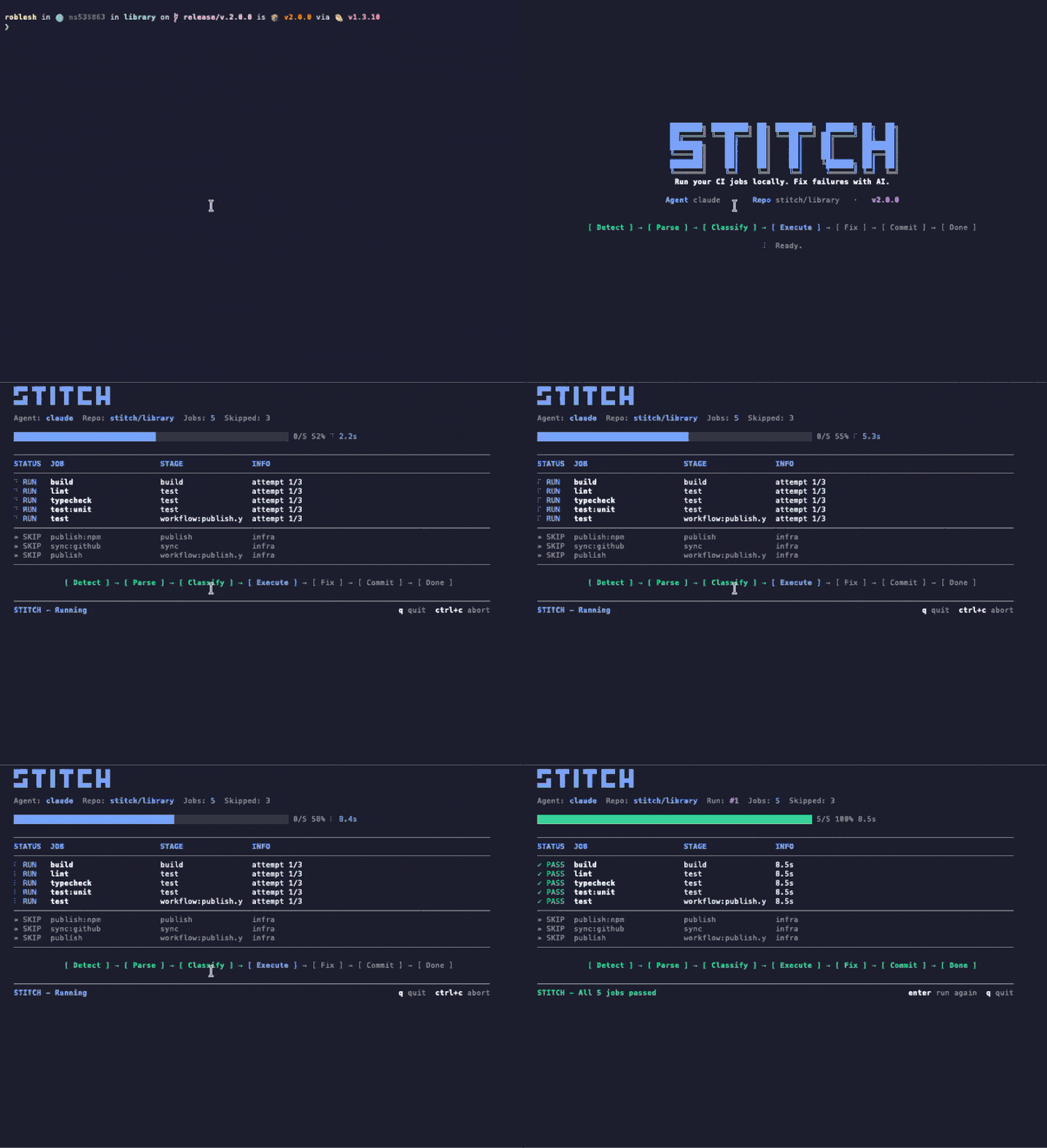
~/repo $ npx stitch-agent run claude
Animated terminal recording of stitch run claude showing the TUI with pipeline stepper, job table, and agent driver panel
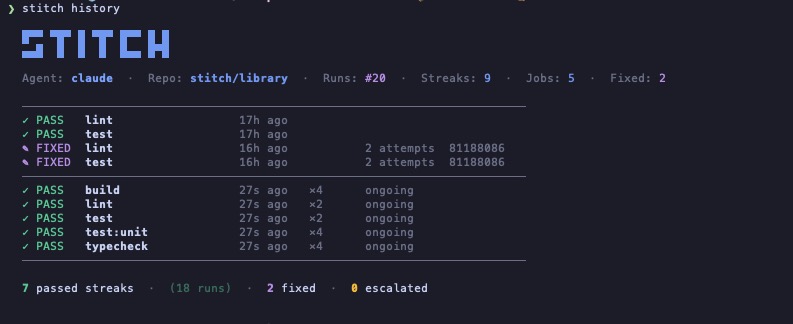
~/repo $ stitch history
Terminal screenshot of stitch history command showing STITCH ASCII logo, agent info, and a table of recent runs with pass, fixed, and ongoing states
실행 기록

모든 실행은 보관됩니다. 연속, 수정, 에스컬레이션.

Stitch는 저장소마다 모든 실행을 기록합니다. 어떤 작업이 스스로 통과하는지, 어떤 것이 에이전트를 필요로 했는지, 어떤 것이 에스컬레이션되었는지 한눈에 볼 수 있습니다. 대시보드도, 계정도 필요 없습니다. 그저 당신의 머신에 있는 파일 하나입니다.

  • Streaks PASS 연속은 개입 없이 계속 통과하는 verify 작업을 보여 줍니다.
  • Fixes FIXED 항목은 에이전트가 실패를 해결한 시점을, 시도 횟수와 commit과 함께 기록합니다.
  • Escalations 에이전트가 시도 한도 안에 해결하지 못한 실패는 감추지 않고 드러냅니다.
05 —— Claude Code 네이티브

에이전트가 당신의 코드를 검증합니다. 부탁할 필요가 없습니다.

Stitch에는 Claude Code용 skill이 포함되어 있습니다. 한 번만 설치하면, 보통 깨진 코드가 새어 나가는 네 가지 순간에 Claude가 자동으로 Stitch를 실행합니다. 플래그도, 명령어도, 프롬프트도 필요 없습니다.

어떻게 느껴지나

1
당신

Claude Code에 "commit and push"라고 입력합니다.

2
Claude

로컬에서 몇 초 만에 Stitch를 실행하고, TUI를 그 자리에 흘려보냅니다.

3
결과

초록이면 push가 나갑니다. 빨강이면 Claude가 먼저 고친 다음 push합니다.

네 가지 자동 트리거

모든 push 전에

Claude에게 push, commit 또는 PR 오픈을 부탁하면 Stitch가 먼저 돕니다. 무언가 실패하면 commit은 당신의 머신에 머무릅니다.

작업이 끝날 때

기능 완료, 버그 수정, 리팩터 착지. Claude는 작업이 끝났다고 선언하기 전 마지막 단계로 Stitch를 실행합니다.

todo를 완료로 표시하기 전에

TodoWrite 항목이 파이프라인에서 검사될 코드를 건드리면, Claude는 체크박스를 체크하기 전에 Stitch를 실행합니다.

컨텍스트를 전환할 때

다른 변경으로 옮겨 갈 때, Claude는 이전 것을 점검해 뒤에 깨진 것이 남지 않게 합니다.

skill은 한 번만 설치

심볼릭 링크 하나. Claude Code가 자동으로 인식하고 "이거 검증해 줘"나 "파이프라인 고쳐 줘" 같은 자연어에 자동 트리거됩니다. /stitch로 명시적으로 호출할 수도 있습니다.

로컬 클론에서
$ ln -s "$(pwd)/skills/stitch" ~/.claude/skills/stitch
글로벌 npm 설치에서
$ ln -s "$(npm root -g)/stitch-agent/skills/stitch" ~/.claude/skills/stitch
06 —— 비교

Stitch는 어떻게 위치하는가

대부분의 CI 어시스턴트는 그들의 클라우드, 모노레포 또는 SDK를 채택하기를 원합니다. Stitch는 당신이 이미 가진 것을 읽고, 당신이 이미 가진 머신에서 돌아갑니다.

기능 Stitch Gitar Nx Cloud Dagger + AI
기존 CI 설정을 사용
작업을 로컬에서 실행 클라우드 전용 클라우드 전용 컨테이너
교체 가능한 AI 에이전트 모든 CLI 에이전트 내장형만 내장형만 내장형만
새 인프라가 필요 없음 SaaS 계정 Nx 모노레포 Dagger SDK
네이티브 Claude Code 통합 skill 포함 제공
가격 무료 $20/사용자/월부터 Nx Cloud 요금제 무료 (OSS)
07 —— 사용법

명령어 하나. 기존 설정 그대로.

Stitch는 이미 가지고 있는 CI 설정을 읽어 같은 잡을 로컬에서 실행합니다. 파이프라인 변경도, 추가 서비스도, 유지해야 할 새 YAML도 없습니다.

terminal
# Run every CI job locally
$ stitch run claude

# Only the jobs you care about
$ stitch run claude --jobs lint,test

# See what would run, without running it
$ stitch run claude --dry-run

# Re-run automatically on every file change
$ stitch run claude --watch --jobs lint,test
.gitlab-ci.yml
# Your existing CI config. Stitch reads it,
# no jobs to add, no changes to make.

lint:
  image: node:20
  script:
    - bun install
    - bun run lint

test:
  image: node:20
  script:
    - bun install
    - bun test

typecheck:
  image: node:20
  script:
    - bun install
    - bun run typecheck
08 —— 안전성

진짜 가드레일

Stitch는 시간, 범위, 그리고 무엇이 당신의 머신을 떠날 수 있는지에 대한 엄격한 제한으로 저장소 내에서 실행됩니다. 당신 모르게 아무 일도 일어나지 않습니다.

실행 타임아웃

모든 작업은 구성 가능한 타임아웃으로 실행됩니다. 폭주하는 명령어는 SIGKILL로 종료되며, 절대 방치되지 않습니다.

인프라 자동 건너뛰기

배포, 게시, 릴리스 작업은 인프라로 분류되어 자동으로 건너뜁니다. 검증 작업만 로컬에서 실행됩니다.

Git 클린 체크

Stitch 시작 전에 브랜치가 깨끗했을 때만 자동 커밋과 푸시가 트리거됩니다. 커밋되지 않은 작업은 손대지 않습니다.

제한된 시도

실패한 작업은 max_attempts (기본 3)까지 재시도합니다. 그 후 Stitch는 토큰을 낭비하지 않고 당신에게 에스컬레이션합니다.

로컬에 머무름

작업, 로그, 수정은 모두 당신의 머신에서 실행됩니다. 클라우드도 텔레메트리도 없으며, 당신이 구성하지 않는 한 webhook도 없습니다.

.stitch.yml
languages: [typescript, python]
linter: eslint
test_runner: vitest
package_manager: pnpm
max_attempts: 3

conventions:
  - "Always use explicit return types on public functions."
  - "Never downgrade dependency versions."

auto_fix: [lint, format, simple_types, config_ci]
escalate: [logic_errors, breaking_changes, dependency_conflicts]

notify:
  channels:
    - type: slack
      webhook_url: https://hooks.slack.com/...
09 —— installation · 12 seconds

One command.
Zero config files.

node ≥20
v20.0+
claude code
installed
docker
optional
telemetry
never
10 —— questions

Questions we hear,
answered in plain words.

What does Stitch actually do?

Stitch reads your existing CI config (GitHub Actions or GitLab CI), runs the verify jobs locally on your machine, and hands any failure to your AI agent (Claude Code or Codex) to fix. When the fix passes locally, Stitch commits and pushes. No remote runner needed for the verify loop.

How is Stitch different from Nx Cloud, Gitar, or Dagger?

Nx Cloud, Gitar, and Dagger ask you to adopt their cloud, monorepo, or SDK. Stitch reads the CI config you already have and runs on the machine you already own. There is no SaaS account, no DSL, and the AI agent is whatever CLI you already use.

Does Stitch require API keys?

No. Stitch uses the Claude Code or Codex credentials you already have on your machine. There is nothing extra to manage and nothing extra to bill.

What CI providers are supported?

GitHub Actions and GitLab CI today, including self-hosted GitLab. Stitch parses the existing config and only runs verify-class jobs locally; deploy and publish jobs are skipped automatically.

Is Stitch free?

Yes. Stitch is open source under the MIT license, distributed on npm as stitch-agent. The only cost is whatever you already pay for your AI agent (Claude Code or Codex).

Does Stitch send my code anywhere?

No. Stitch runs locally. Your code stays on your machine. Your AI agent talks to its own API directly using your existing credentials, exactly the way it does when you run it manually. Stitch has no telemetry and no webhooks unless you configure them.

Can I use Stitch without Claude Code?

Yes. The agent layer is pluggable. Codex CLI works today; any CLI agent that takes a task description and returns code patches can be wired in. Claude Code is the default because we built the integration first, not because it is locked in.