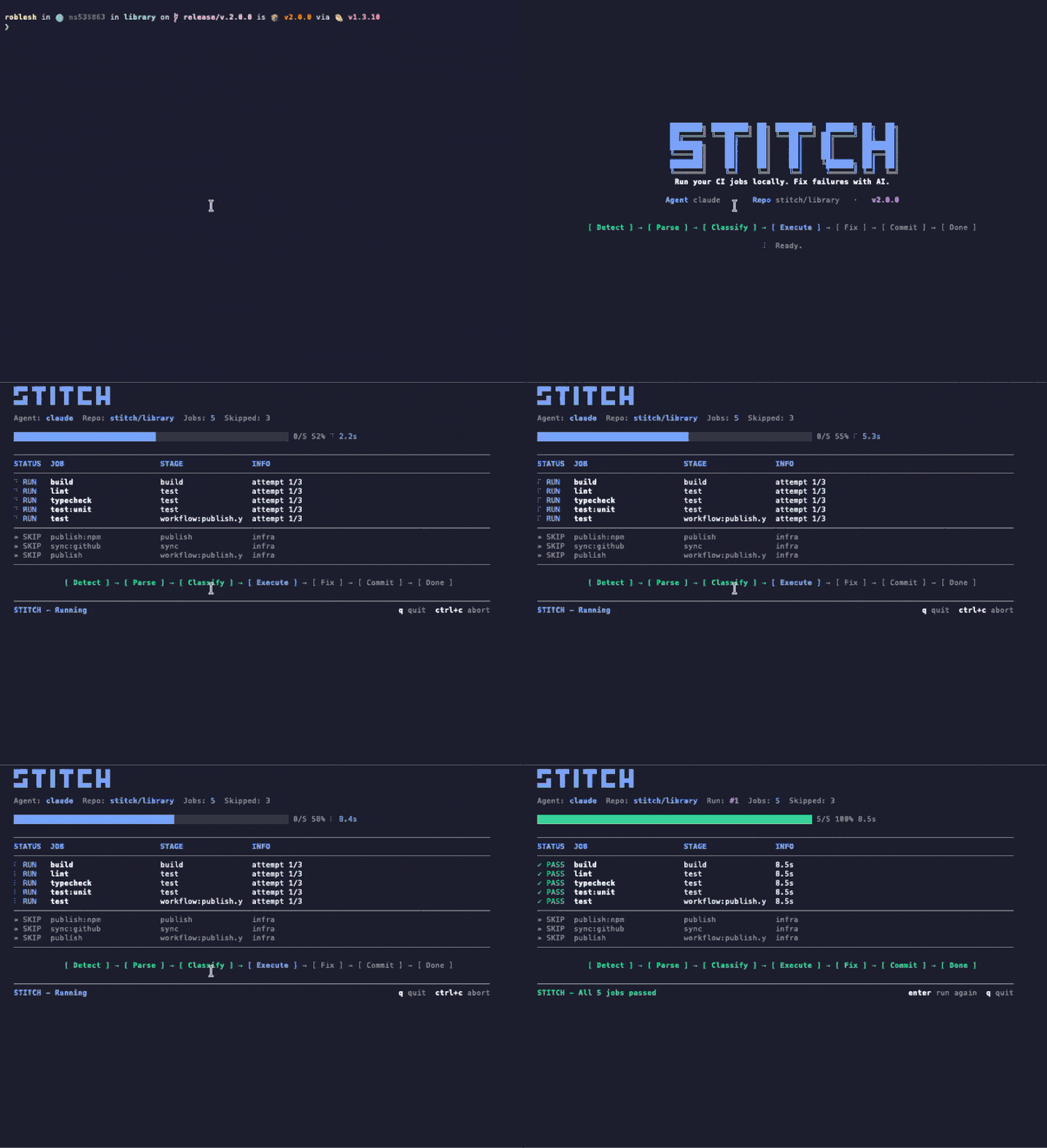
CIをローカルで実行。失敗はAIが修正します。Stitchは既存のCI設定を読み取り、ジョブを数秒でマシン上で実行し、失敗はそれを直すAIエージェントに引き渡します。APIキーも設定ファイルも不要です。
Stitch runs your CI config — but on your machine, before you push. When it finds a failure, it hands the context to Claude and applies the patch. No broken PR opened.
設定から緑色のCIまで、Stitchはターミナルを離れることなくマシン上でループ全体を実行します。
stitch run claude を実行します。Stitchは .gitlab-ci.yml やGitHub Actionsワークフローを解析し、ジョブを分類し、インフラストラクチャジョブを自動的にスキップします。
ジョブはタイムアウトと分離を持ちローカルで実行されます。結果は進捗トラッキング付きのライブTUIに表示されます。分単位ではなく秒単位で。
失敗したジョブはAIエージェント(Claude CodeまたはCodex)に引き渡されます。エージェントは調査し、ファイルを編集し、Stitchが再実行して検証します。あなたにエスカレートする前に最大3回試行します。
No intermediate server. Stitch runs in your shell, reads your file tree, and writes patches on top. Shut it down and nothing lingers.
Uses the Claude Code credentials you already have. We do not ask for tokens, we do not store anything.
Every patch lands in an isolated commit. git reset takes you back exactly where you were.
Whatever you would see in your cloud CI, you see in your terminal. Same jobs, same containers, same result — without the wait cycle.
Stitchはコードレビューをすり抜けた問題——リントエラー、型の不一致、テストの失敗——を検出し、気づく前に修正します。
既存の .gitlab-ci.yml や GitHub Actions をそのまま使用。セットアップも書き直しも追加の YAML も不要です。
数秒でローカルマシン上でジョブを実行。リモートランナーやパイプラインの待ち行列を待つ必要はありません。
Claude Code や OpenAI Codex を差し込むだけ。既存のサブスクリプションを利用し、APIキー管理も不要。
Stitch の動作中に進捗、ジョブ状態、ドライバーのアクティビティをリアルタイム表示する美しいターミナルUI。
コーディング中も継続的に検証。ファイル変更時にジョブが自動で再実行されます。
deploy・publish・インフラ系ジョブを自動で分類してスキップ。ローカルで意味のあるものだけを実行します。
修正が通ると Stitch が自動でコミット&プッシュ。あなたはフローに留まれます。
GitLab CI と GitHub Actions、セルフホスト版も対応。既存の設定をそのまま読み取ります。
このページの他の部分は Stitch が何をするかです。下の録画は Stitch がそれをしている姿です。実機のターミナルから、無編集で収録しています。
1つのコマンドで、Stitch が CI 設定を解析し、verify ジョブをローカルで実行し、失敗を Claude Code または Codex に渡して、修正を再検証します。すべてが1つのターミナルウィンドウに流れます。
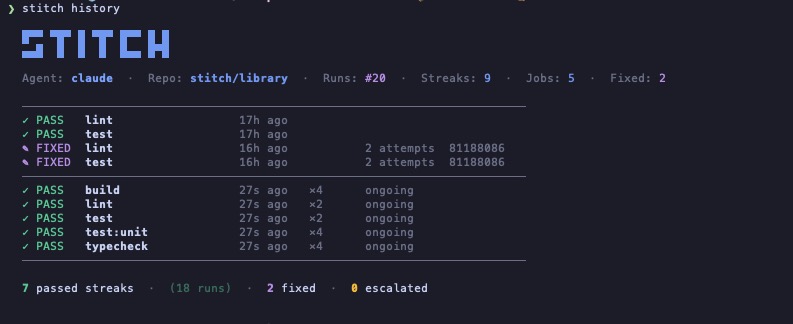
Stitch はリポジトリごとにすべての実行を記録します。どのジョブが自力でパスし、どれがエージェントを必要とし、どれがエスカレートされたかをひと目で把握できます。ダッシュボードもアカウントも不要です。あなたのマシンにあるファイルだけです。
Stitch には Claude Code 用の skill が同梱されています。一度インストールすれば、壊れたコードがすり抜けがちな4つのタイミングで Claude が自動的に Stitch を実行します。フラグも、コマンドも、プロンプトもいりません。
Claude Code に「commit and push」と入力します。
数秒でローカルに Stitch を実行し、TUI をその場で流します。
グリーンなら push が通ります。レッドなら Claude が先に直してから push します。
Claude に push、commit、または PR のオープンを頼むと、まず Stitch が走ります。何か失敗すれば、commit はあなたのマシンにとどまります。
機能が完成、バグが修正、リファクタが着地。Claude は作業を完了と宣言する前の最後のステップとして Stitch を実行します。
TodoWrite の項目がパイプラインでチェックされるようなコードに触れている場合、Claude はチェックを入れる前に Stitch を実行します。
別の変更に切り替えるときは、Claude が前のものを確認し、壊れたものが残らないようにします。
シンボリックリンクが1つあれば十分です。Claude Code が自動で取り込み、「これを検証して」「パイプラインを直して」といった自然言語の言及で自動起動します。/stitch と明示的に呼び出すこともできます。
$ ln -s "$(pwd)/skills/stitch" ~/.claude/skills/stitch
$ ln -s "$(npm root -g)/stitch-agent/skills/stitch" ~/.claude/skills/stitch
ほとんどの CI アシスタントは、自分たちのクラウド、モノレポ、SDK を採用するように求めます。Stitch はあなたが既に持っているものを読み、既に持っているマシンで動きます。
| 機能 | Stitch | Gitar | Nx Cloud | Dagger + AI |
|---|---|---|---|---|
| 既存の CI 設定を使う | ✓ | ✕ | ✕ | ✕ |
| ジョブをローカルで実行 | ✓ | クラウドのみ | クラウドのみ | コンテナ |
| 差し替え可能な AI エージェント | 任意の CLI エージェント | 組み込みのみ | 組み込みのみ | 組み込みのみ |
| 新しいインフラが必要 | なし | SaaS アカウント | Nx モノレポ | Dagger SDK |
| ネイティブな Claude Code 連携 | skill 同梱 | ✕ | ✕ | ✕ |
| 価格 | 無料 | $20/ユーザー/月から | Nx Cloud プラン | 無料(OSS) |
Stitchはすでにある CI 設定を読み取り、同じジョブをローカルで実行します。パイプラインの変更も、追加サービスも、新しい YAML のメンテナンスも必要ありません。
# Run every CI job locally $ stitch run claude # Only the jobs you care about $ stitch run claude --jobs lint,test # See what would run, without running it $ stitch run claude --dry-run # Re-run automatically on every file change $ stitch run claude --watch --jobs lint,test
# Your existing CI config. Stitch reads it, # no jobs to add, no changes to make. lint: image: node:20 script: - bun install - bun run lint test: image: node:20 script: - bun install - bun test typecheck: image: node:20 script: - bun install - bun run typecheck
Stitchはあなたのリポジトリ内で、時間、スコープ、マシンから外に出られるものに厳格な制限を設けて実行されます。あなたの知らないところでは何も起きません。
各ジョブは設定可能なタイムアウトで実行されます。暴走したコマンドはSIGKILLで終了され、決して放置されません。
デプロイ、パブリッシュ、リリースジョブはインフラとして分類され、自動的にスキップされます。検証ジョブのみがローカルで実行されます。
Stitch開始前にブランチがクリーンだった場合のみ、自動コミットとプッシュがトリガーされます。未コミットの作業は触れられません。
失敗したジョブはmax_attempts(デフォルト3回)まで再試行されます。その後、Stitchはトークンを浪費せずあなたにエスカレートします。
ジョブ、ログ、修正のすべてがあなたのマシン上で実行されます。クラウドもテレメトリもwebhookも、あなたが設定しない限りありません。
languages: [typescript, python] linter: eslint test_runner: vitest package_manager: pnpm max_attempts: 3 conventions: - "Always use explicit return types on public functions." - "Never downgrade dependency versions." auto_fix: [lint, format, simple_types, config_ci] escalate: [logic_errors, breaking_changes, dependency_conflicts] notify: channels: - type: slack webhook_url: https://hooks.slack.com/...
Stitch reads your existing CI config (GitHub Actions or GitLab CI), runs the verify jobs locally on your machine, and hands any failure to your AI agent (Claude Code or Codex) to fix. When the fix passes locally, Stitch commits and pushes. No remote runner needed for the verify loop.
Nx Cloud, Gitar, and Dagger ask you to adopt their cloud, monorepo, or SDK. Stitch reads the CI config you already have and runs on the machine you already own. There is no SaaS account, no DSL, and the AI agent is whatever CLI you already use.
No. Stitch uses the Claude Code or Codex credentials you already have on your machine. There is nothing extra to manage and nothing extra to bill.
GitHub Actions and GitLab CI today, including self-hosted GitLab. Stitch parses the existing config and only runs verify-class jobs locally; deploy and publish jobs are skipped automatically.
Yes. Stitch is open source under the MIT license, distributed on npm as stitch-agent. The only cost is whatever you already pay for your AI agent (Claude Code or Codex).
No. Stitch runs locally. Your code stays on your machine. Your AI agent talks to its own API directly using your existing credentials, exactly the way it does when you run it manually. Stitch has no telemetry and no webhooks unless you configure them.
Yes. The agent layer is pluggable. Codex CLI works today; any CLI agent that takes a task description and returns code patches can be wired in. Claude Code is the default because we built the integration first, not because it is locked in.