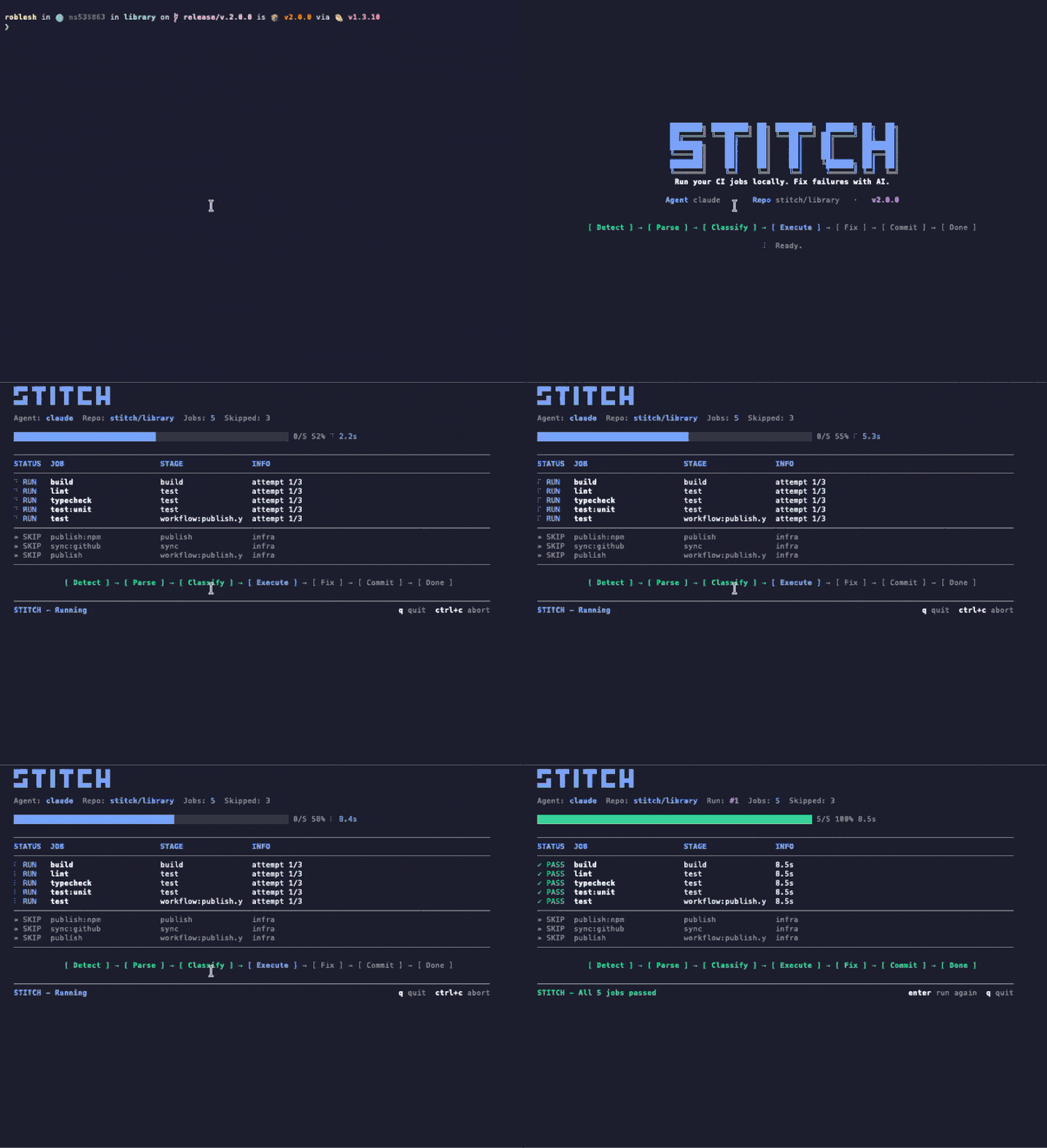
รัน CI ของคุณบนเครื่องคุณเอง แก้ไขความล้มเหลวด้วย AI Stitch อ่านคอนฟิก CI ที่คุณมีอยู่แล้ว รันงานบนเครื่องของคุณในไม่กี่วินาที และส่งงานที่ล้มเหลวให้ AI agent แก้ไข ไม่ต้องใช้ API key ไม่ต้องมีไฟล์คอนฟิก
Stitch runs your CI config — but on your machine, before you push. When it finds a failure, it hands the context to Claude and applies the patch. No broken PR opened.
จากคอนฟิกถึง CI สีเขียว Stitch รันลูปทั้งหมดบนเครื่องของคุณโดยไม่ต้องออกจากเทอร์มินัล
รัน stitch run claude. Stitch จะวิเคราะห์ .gitlab-ci.yml หรือ GitHub Actions workflows ของคุณ จำแนก jobs และข้าม jobs โครงสร้างพื้นฐานโดยอัตโนมัติ
Jobs รันภายในเครื่องพร้อม timeouts และการแยกแยก ผลลัพธ์ปรากฏใน TUI สดพร้อมการติดตามความคืบหน้า วินาที ไม่ใช่นาที
Jobs ที่ล้มเหลวจะถูกส่งต่อให้ AI agent ของคุณ (Claude Code หรือ Codex) Agent สืบสวน แก้ไขไฟล์ และ Stitch จะรันซ้ำเพื่อยืนยัน สูงสุด 3 ครั้งก่อนยกระดับให้คุณ
No intermediate server. Stitch runs in your shell, reads your file tree, and writes patches on top. Shut it down and nothing lingers.
Uses the Claude Code credentials you already have. We do not ask for tokens, we do not store anything.
Every patch lands in an isolated commit. git reset takes you back exactly where you were.
Whatever you would see in your cloud CI, you see in your terminal. Same jobs, same containers, same result — without the wait cycle.
Stitch จับสิ่งที่หลุดผ่าน code review — lint error, ประเภทข้อมูลไม่ตรง, test พัง — และแก้ไขก่อนที่คุณจะทันสังเกต
ใช้ .gitlab-ci.yml หรือ GitHub Actions เดิมของคุณ ไม่ต้องตั้งค่า ไม่ต้องเขียนใหม่ ไม่ต้องมี YAML เพิ่ม
รัน job บนเครื่องคุณในไม่กี่วินาที ไม่ต้องรอ runner ระยะไกลหรือคิวของไปป์ไลน์
ใช้ Claude Code หรือ OpenAI Codex ใช้สมาชิกที่คุณมีอยู่แล้ว ไม่ต้องจัดการ API key ใด ๆ
UI เทอร์มินัลสวยงาม แสดงความคืบหน้า สถานะ job และกิจกรรมของ driver แบบเรียลไทม์ขณะที่ Stitch ทำงาน
ตรวจสอบอย่างต่อเนื่องขณะเขียนโค้ด รัน job ใหม่อัตโนมัติทันทีที่ไฟล์เปลี่ยน
จัดประเภทและข้าม job ประเภท deploy, publish และ infra อัตโนมัติ รันเฉพาะสิ่งที่จำเป็นในเครื่อง
เมื่อแก้ไขผ่าน Stitch จะ commit และ push ให้อัตโนมัติ คุณอยู่ในโฟลว์ต่อได้
GitLab CI และ GitHub Actions รองรับแบบ self-hosted อ่านคอนฟิกเดิมของคุณตามจริง
อย่างอื่นในหน้านี้คือสิ่งที่ Stitch ทำ คลิปด้านล่างคือหน้าตาของ Stitch ตอนกำลังทำ บันทึกจากเทอร์มินัลจริง ไม่ได้ตัดต่อ
หนึ่งคำสั่ง Stitch วิเคราะห์คอนฟิก CI รัน verify jobs ภายในเครื่อง ส่งงานที่ล้มให้ Claude Code หรือ Codex แล้วตรวจซ้ำ ทุกอย่างไหลในหน้าต่างเทอร์มินัลเดียว
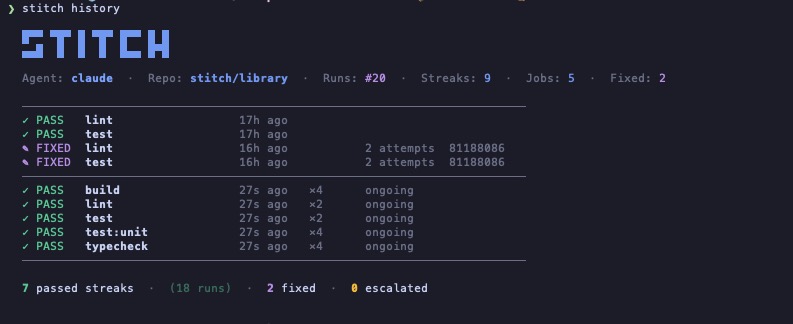
Stitch บันทึกทุกการรันบน repo คุณมองปราดเดียวรู้ว่า job ไหนผ่านเอง อันไหนต้องใช้เอเจนต์ อันไหนถูกส่งต่อ ไม่มี dashboard ไม่มีบัญชี แค่ไฟล์บนเครื่องคุณ
Stitch มาพร้อม skill ของ Claude Code ติดตั้งครั้งเดียวแล้ว Claude จะรัน Stitch อัตโนมัติในสี่จุดที่โค้ดพังมักหลุดรอด ไม่มี flag ไม่มีคำสั่ง ไม่มี prompt
พิมพ์ "commit and push" ใน Claude Code
รัน Stitch ภายในเครื่องในไม่กี่วินาที TUI สดอยู่ในบรรทัด
เขียว push ผ่าน แดง Claude แก้ก่อนแล้วค่อย push
บอก Claude ให้ push, commit หรือเปิด PR Stitch จะรันก่อน ถ้าล้มเหลว commit ก็อยู่บนเครื่องคุณ
ฟีเจอร์เสร็จ บั๊กแก้แล้ว refactor จบ Claude จะรัน Stitch เป็นขั้นตอนสุดท้ายก่อนประกาศว่างานเสร็จ
ถ้ารายการ TodoWrite แตะโค้ดที่ pipeline จะเช็ค Claude จะรัน Stitch ก่อนติ๊กช่อง
เมื่อคุณเปลี่ยนไปทำงานอื่น Claude จะตรวจงานก่อนหน้าเพื่อไม่ให้มีของพังทิ้งไว้
ใช้ symlink เดียว Claude Code ตรวจจับเองและจะทริกเกอร์อัตโนมัติเมื่อพูดเป็นภาษาธรรมชาติ เช่น "ตรวจอันนี้หน่อย" หรือ "แก้ pipeline ให้ที" คุณยังเรียกตรงๆ ด้วย /stitch ก็ได้
$ ln -s "$(pwd)/skills/stitch" ~/.claude/skills/stitch
$ ln -s "$(npm root -g)/stitch-agent/skills/stitch" ~/.claude/skills/stitch
ผู้ช่วย CI ส่วนใหญ่อยากให้คุณไปใช้ cloud ของเขา, monorepo ของเขา หรือ SDK ของเขา Stitch อ่านของที่คุณมีอยู่แล้วและรันบนเครื่องที่คุณมีอยู่แล้ว
| ความสามารถ | Stitch | Gitar | Nx Cloud | Dagger + AI |
|---|---|---|---|---|
| ใช้คอนฟิก CI เดิมของคุณ | ✓ | ✕ | ✕ | ✕ |
| รัน jobs ภายในเครื่อง | ✓ | เฉพาะ cloud | เฉพาะ cloud | คอนเทนเนอร์ |
| AI agent เปลี่ยนได้ | CLI agent ตัวไหนก็ได้ | เฉพาะที่มีในตัว | เฉพาะที่มีในตัว | เฉพาะที่มีในตัว |
| ต้องใช้ infra ใหม่ | ไม่มี | บัญชี SaaS | Nx monorepo | Dagger SDK |
| รวม Claude Code มาในตัว | มาพร้อม skill | ✕ | ✕ | ✕ |
| ราคา | ฟรี | เริ่มที่ $20/ผู้ใช้/เดือน | แพ็กเกจ Nx Cloud | ฟรี (OSS) |
Stitch อ่านคอนฟิก CI ที่คุณมีอยู่แล้ว และรัน job เดียวกันบนเครื่องของคุณ ไม่ต้องแก้ pipeline ไม่ต้องมีบริการเพิ่ม ไม่ต้องดูแล YAML ใหม่
# Run every CI job locally $ stitch run claude # Only the jobs you care about $ stitch run claude --jobs lint,test # See what would run, without running it $ stitch run claude --dry-run # Re-run automatically on every file change $ stitch run claude --watch --jobs lint,test
# Your existing CI config. Stitch reads it, # no jobs to add, no changes to make. lint: image: node:20 script: - bun install - bun run lint test: image: node:20 script: - bun install - bun test typecheck: image: node:20 script: - bun install - bun run typecheck
Stitch ทำงานภายในรีโปของคุณพร้อมขีดจำกัดที่เข้มงวดเรื่องเวลา ขอบเขต และสิ่งที่สามารถออกจากเครื่องของคุณได้ ไม่มีอะไรเกิดขึ้นลับหลังคุณ
ทุก job รันด้วย timeout ที่กำหนดค่าได้ คำสั่งที่ควบคุมไม่ได้จะถูกหยุดด้วย SIGKILL ไม่ถูกปล่อยค้าง
Jobs ที่เป็น deploy, publish และ release ถูกจัดเป็น infra และข้ามอัตโนมัติ มีเพียง verify jobs ที่รันภายในเครื่อง
Auto-commit และ push จะทำงานก็ต่อเมื่อ branch สะอาดก่อน Stitch เริ่มทำงาน งานที่ยังไม่ได้ commit ของคุณจะไม่ถูกแตะต้อง
Jobs ที่ล้มเหลวจะลองใหม่สูงสุด max_attempts (ค่าเริ่มต้น 3) หลังจากนั้น Stitch จะยกระดับให้คุณแทนที่จะใช้ tokens หมด
Jobs, logs และ fixes ทั้งหมดทำงานบนเครื่องของคุณ ไม่มี cloud, telemetry, หรือ webhooks เว้นแต่คุณจะตั้งค่า
languages: [typescript, python] linter: eslint test_runner: vitest package_manager: pnpm max_attempts: 3 conventions: - "Always use explicit return types on public functions." - "Never downgrade dependency versions." auto_fix: [lint, format, simple_types, config_ci] escalate: [logic_errors, breaking_changes, dependency_conflicts] notify: channels: - type: slack webhook_url: https://hooks.slack.com/...
Stitch reads your existing CI config (GitHub Actions or GitLab CI), runs the verify jobs locally on your machine, and hands any failure to your AI agent (Claude Code or Codex) to fix. When the fix passes locally, Stitch commits and pushes. No remote runner needed for the verify loop.
Nx Cloud, Gitar, and Dagger ask you to adopt their cloud, monorepo, or SDK. Stitch reads the CI config you already have and runs on the machine you already own. There is no SaaS account, no DSL, and the AI agent is whatever CLI you already use.
No. Stitch uses the Claude Code or Codex credentials you already have on your machine. There is nothing extra to manage and nothing extra to bill.
GitHub Actions and GitLab CI today, including self-hosted GitLab. Stitch parses the existing config and only runs verify-class jobs locally; deploy and publish jobs are skipped automatically.
Yes. Stitch is open source under the MIT license, distributed on npm as stitch-agent. The only cost is whatever you already pay for your AI agent (Claude Code or Codex).
No. Stitch runs locally. Your code stays on your machine. Your AI agent talks to its own API directly using your existing credentials, exactly the way it does when you run it manually. Stitch has no telemetry and no webhooks unless you configure them.
Yes. The agent layer is pluggable. Codex CLI works today; any CLI agent that takes a task description and returns code patches can be wired in. Claude Code is the default because we built the integration first, not because it is locked in.